Selecteaza limba

IRS Form 6781 – Fillable PDF for Gains & Losses from Section 1256 Contracts

  1. Țară STATELE UNITE ALE AMERICII
  2. Limba Engleză
  3. Activitate Impozite
  4. Departament Serviciul de Venituri Interne
IRS Form 6781 – Fillable PDF for Gains & Losses from Section 1256 Contracts

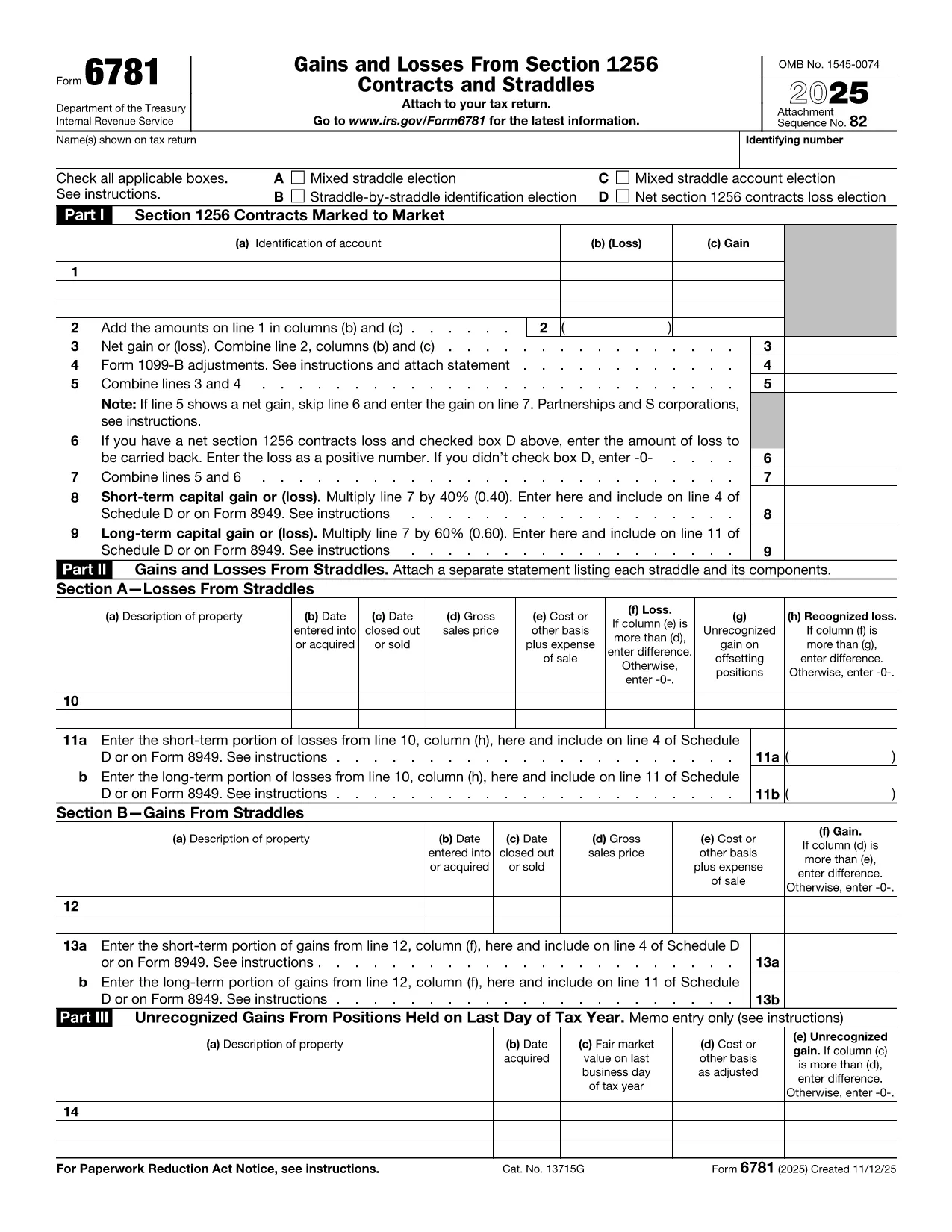
Form 6781, officially titled Gains and Losses From Section 1256 Contracts and Straddles, is required for traders, investors, and any taxpayer who holds regulated futures, options, foreign‑currency contracts, or other Section 1256 instruments. This one‑page form reports both short‑term and long‑term capital results, and it includes election boxes for mixed‑straddle and loss‑carryback options.

What Is IRS Form 6781?

The form captures three distinct sections:

  • Part I – Section 1256 Contracts Marked to Market
  • Part II – Gains and Losses from Straddles
  • Part III – Unrecognized Gains on Positions Held at Year‑End

Each part helps the IRS calculate the correct mix of short‑term (40%) and long‑term (60%) capital treatment, regardless of the actual holding period.

How to Fill Out the Form Using Formize

Instead of printing, scanning, or editing the PDF in a desktop editor, you can complete the form directly in your browser:

  1. Click "Fill out this form" on the page – the Formize PDF Filler loads instantly.
  2. Enter your name, Social Security or EIN, and the tax year.
  3. Select any applicable election boxes (Mixed Straddle, Straddle‑by‑Straddle, etc.).
  4. Enter contract identifiers, gains, and losses for each line item.
  5. Review the calculations, then click Save to download a completed PDF or Print to file with your return.

The online filler validates numeric fields and ensures required boxes are checked, reducing the chance of IRS rejections.

Common Mistakes to Avoid

  • Leaving election boxes unchecked when a mixed straddle exists.
  • Reporting the same contract in both Part I and Part II.
  • Mis‑calculating the 60/40 split of long‑term vs. short‑term gains.
  • Forgetting to attach a statement when you elect a net Section 1256 loss carryback.

When to File and Who Needs This Form

Form 6781 is attached to your individual, corporate, partnership, or trust tax return (Form 1040, 1120, 1065, or 1041). The filing deadline matches the underlying return – typically April 15 for individuals, with extensions available.

If you traded any Section 1256 contracts during the tax year, you must file Form 6781, even if the net result is a zero gain or loss.

Ready to get started? Click the button below to open the fillable version and complete it in seconds.

FAQ
  • What types of contracts are reported on Form 6781?

    Section 1256 contracts include regulated futures, foreign‑currency contracts, non‑equity options, dealer equity options, and dealer securities futures contracts.

  • Do I need to file Form 6781 if I had no gain or loss?

    Yes. If you held any Section 1256 contracts during the year, you must file Form 6781 even if the net result is zero.

  • Can I e‑file Form 6781 with my return?

    Form 6781 is attached to the main tax return (Form 1040, 1120, etc.). When you e‑file the return, the completed PDF is included automatically.

  • What is the deadline for filing Form 6781?

    The deadline matches the filing deadline of the associated tax return – typically April 15 for individuals, with extensions available.

  • How does the 60/40 long‑term/short‑term split work?

    Regardless of how long you held the contract, 60% of the gain or loss is treated as long‑term capital, and 40% as short‑term capital.

  • Can I carry back a net Section 1256 loss?

    Yes, individuals may carry back a net Section 1256 loss up to three prior years, but corporations, partnerships, estates, and trusts are not eligible.

  • What common errors should I watch for?

    Common mistakes include forgetting to check required election boxes, double‑reporting contracts in both Part I and Part II, and mis‑calculating the 60/40 split.

  • Is there a printable version if I prefer paper?

    The fillable PDF can be downloaded, printed, and mailed, but using the online filler reduces errors and speeds up the process.

CUM SĂ

Cum să completați Form 6781 gratuit, online, în 5 pași simpli:

  1. 1
    Open the Fillable Form
    Click the "Fill out this form" button on the page. The Formize PDF Filler will load instantly in your browser.
  2. 2
    Enter Taxpayer Information
    Provide your name, Social Security Number (or EIN), and the tax year at the top of the form.
  3. 3
    Select Election Boxes
    Check any applicable boxes for mixed straddle elections, straddle‑by‑straddle identification, or net loss carryback.
  4. 4
    Report Gains and Losses
    Enter each contract’s identification, mark‑to‑market gain or loss, and let the filler calculate the 60% long‑term / 40% short‑term split.
  5. 5
    Save or Print
    When all fields are complete, click "Save" to download the finished PDF or "Print" to attach it to your tax return.
Aplicația Formize PDF Filler
DESPRE

Formulare fiscale

Form 6781 este unul dintre formularele fiscale care sunt documente utilizate pentru a raporta informații legate de taxe către autoritatea fiscală relevantă. Există diferite tipuri de formulare fiscale, inclusiv formulare fiscale federale, de stat și locale, care pot varia în funcție de circumstanțele și locația contribuabilului.

CARACTERISTICI

Filler PDF

Cel mai simplu mod de a completa Form 6781 online

  • Completați rapid Form 6781
    Căutați o modalitate de a completa rapid Form 6781 online? Cu ajutorul nostru online gratuit de completare a formularelor PDF, veți ști cum să editați și să completați acest document pdf în mai puțin de un minut.
  • Editor PDF online ușor de utilizat
    Sătul de tipărirea fișierelor PDF pentru a le putea edita, înainte de a le rescana și a le trimite înapoi? Editați documente PDF gratuit online. Utilizați editorul nostru online de pdf pentru a economisi timp și hârtie.
  • Instrumente grozave, toate platformele
    Vă întrebați cum să completați Form 6781 pe un Mac sau poate cum să utilizați un fișier PDF gratuit? Instrumentele noastre PDF online funcționează pe toate platformele.
  • Stocare securizată a fișierelor
    Fișierele „Form 6781” finalizate sunt stocate într-o bază de date securizată gestionată de Amazon Cloud hosting. Puteți șterge oricând fișierele din sistemul nostru. În orice caz, aceste fișiere sunt șterse automat după 24 de ore.
  • Chat cu Form 6781
    Conversați cu „Form 6781” pe Chatize, care este un asistent de citire PDF gratuit. Puneți întrebări și obțineți răspunsuri de la „Form 6781”. Doar faceți clic pe butonul Conversați cu documentul de mai sus.

Ștergeți sesiunea de umplere

Ștergeți sesiunea de umplere selectată? În acest caz, progresul dumneavoastră în completarea formularului se va pierde.

Ștergeți sesiunea de editare

Ștergeți sesiunea de editare selectată? În acest caz, progresul dvs. în crearea și editarea formularului se va pierde.