
Chọn ngôn ngữ

IRS Form 6781 – Fillable PDF for Gains & Losses from Section 1256 Contracts

  1. Quốc gia Hoa Kỳ
  2. Ngôn ngữ Tiếng Anh
  3. Hoạt động thuế
  4. Phòng Internal Revenue Service
IRS Form 6781 – Fillable PDF for Gains & Losses from Section 1256 Contracts

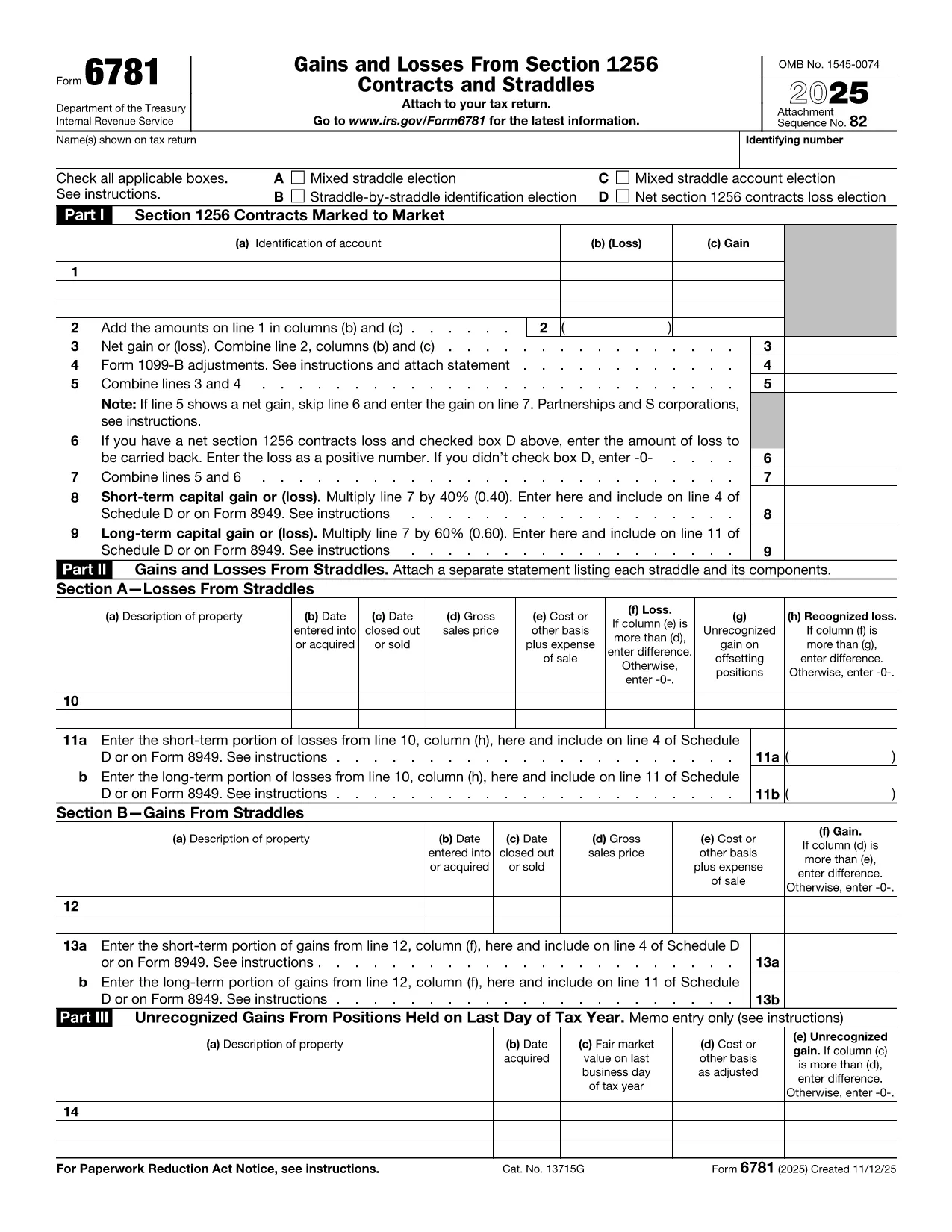
Form 6781, officially titled Gains and Losses From Section 1256 Contracts and Straddles, is required for traders, investors, and any taxpayer who holds regulated futures, options, foreign‑currency contracts, or other Section 1256 instruments. This one‑page form reports both short‑term and long‑term capital results, and it includes election boxes for mixed‑straddle and loss‑carryback options.

What Is IRS Form 6781?

The form captures three distinct sections:

  • Part I – Section 1256 Contracts Marked to Market
  • Part II – Gains and Losses from Straddles
  • Part III – Unrecognized Gains on Positions Held at Year‑End

Each part helps the IRS calculate the correct mix of short‑term (40%) and long‑term (60%) capital treatment, regardless of the actual holding period.

How to Fill Out the Form Using Formize

Instead of printing, scanning, or editing the PDF in a desktop editor, you can complete the form directly in your browser:

  1. Click "Fill out this form" on the page – the Formize PDF Filler loads instantly.
  2. Enter your name, Social Security or EIN, and the tax year.
  3. Select any applicable election boxes (Mixed Straddle, Straddle‑by‑Straddle, etc.).
  4. Enter contract identifiers, gains, and losses for each line item.
  5. Review the calculations, then click Save to download a completed PDF or Print to file with your return.

The online filler validates numeric fields and ensures required boxes are checked, reducing the chance of IRS rejections.

Common Mistakes to Avoid

  • Leaving election boxes unchecked when a mixed straddle exists.
  • Reporting the same contract in both Part I and Part II.
  • Mis‑calculating the 60/40 split of long‑term vs. short‑term gains.
  • Forgetting to attach a statement when you elect a net Section 1256 loss carryback.

When to File and Who Needs This Form

Form 6781 is attached to your individual, corporate, partnership, or trust tax return (Form 1040, 1120, 1065, or 1041). The filing deadline matches the underlying return – typically April 15 for individuals, with extensions available.

If you traded any Section 1256 contracts during the tax year, you must file Form 6781, even if the net result is a zero gain or loss.

Ready to get started? Click the button below to open the fillable version and complete it in seconds.

CÂU HỎI THƯỜNG GẶP
  • What types of contracts are reported on Form 6781?

    Section 1256 contracts include regulated futures, foreign‑currency contracts, non‑equity options, dealer equity options, and dealer securities futures contracts.

  • Do I need to file Form 6781 if I had no gain or loss?

    Yes. If you held any Section 1256 contracts during the year, you must file Form 6781 even if the net result is zero.

  • Can I e‑file Form 6781 with my return?

    Form 6781 is attached to the main tax return (Form 1040, 1120, etc.). When you e‑file the return, the completed PDF is included automatically.

  • What is the deadline for filing Form 6781?

    The deadline matches the filing deadline of the associated tax return – typically April 15 for individuals, with extensions available.

  • How does the 60/40 long‑term/short‑term split work?

    Regardless of how long you held the contract, 60% of the gain or loss is treated as long‑term capital, and 40% as short‑term capital.

  • Can I carry back a net Section 1256 loss?

    Yes, individuals may carry back a net Section 1256 loss up to three prior years, but corporations, partnerships, estates, and trusts are not eligible.

  • What common errors should I watch for?

    Common mistakes include forgetting to check required election boxes, double‑reporting contracts in both Part I and Part II, and mis‑calculating the 60/40 split.

  • Is there a printable version if I prefer paper?

    The fillable PDF can be downloaded, printed, and mailed, but using the online filler reduces errors and speeds up the process.

LÀM THẾ NÀO ĐỂ

Cách điền Form 6781 miễn phí, trực tuyến trong 5 bước đơn giản:

  1. 1
    Open the Fillable Form
    Click the "Fill out this form" button on the page. The Formize PDF Filler will load instantly in your browser.
  2. 2
    Enter Taxpayer Information
    Provide your name, Social Security Number (or EIN), and the tax year at the top of the form.
  3. 3
    Select Election Boxes
    Check any applicable boxes for mixed straddle elections, straddle‑by‑straddle identification, or net loss carryback.
  4. 4
    Report Gains and Losses
    Enter each contract’s identification, mark‑to‑market gain or loss, and let the filler calculate the 60% long‑term / 40% short‑term split.
  5. 5
    Save or Print
    When all fields are complete, click "Save" to download the finished PDF or "Print" to attach it to your tax return.
Định dạng ứng dụng PDF Filler
TRONG KHOẢNG

Đơn thuế

Form 6781 là một trong những Biểu mẫu khai thuế là văn bản dùng để khai báo các thông tin liên quan đến thuế với cơ quan thuế liên quan. Có nhiều loại biểu mẫu thuế khác nhau, bao gồm biểu mẫu thuế liên bang, tiểu bang và địa phương, có thể khác nhau tùy thuộc vào hoàn cảnh và địa điểm của người nộp thuế.

ĐẶC TRƯNG

Trình điền PDF

Cách dễ nhất để điền vào các mẫu PDF trực tuyến

  • Nhanh chóng điền vào Form 6781
    Bạn đang tìm cách điền nhanh Form 6781 trực tuyến? Với trình điền biểu mẫu PDF miễn phí trực tuyến của chúng tôi, bạn sẽ biết cách chỉnh sửa và điền vào tài liệu pdf này trong vòng chưa đầy một phút.
  • Trình chỉnh sửa PDF trực tuyến dễ sử dụng
    Chán nản với việc in ra các tệp PDF để bạn có thể chỉnh sửa chúng trước khi quét lại và gửi lại? Chỉnh sửa tài liệu PDF trực tuyến miễn phí. Sử dụng trình chỉnh sửa pdf trực tuyến của chúng tôi để tiết kiệm thời gian và giấy.
  • Công cụ tuyệt vời, tất cả các nền tảng
    Bạn muốn biết cách điền Form 6781 trên máy Mac hoặc có thể là cách sử dụng trình điền PDF miễn phí? Các công cụ PDF trực tuyến của chúng tôi hoạt động trên tất cả các nền tảng.
  • Lưu trữ tệp an toàn
    Các tệp "Form 6781" đã hoàn thành được lưu trữ trong cơ sở dữ liệu bảo mật do dịch vụ lưu trữ Amazon Cloud quản lý. Bạn có thể xóa các tệp của mình khỏi hệ thống của chúng tôi bất cứ lúc nào. Trong mọi trường hợp, các tệp này sẽ tự động bị xóa sau 24 giờ.
  • Trò chuyện với Form 6781
    Trò chuyện với "Form 6781" trên Trò chuyện, một trợ lý đọc PDF miễn phí. Đặt câu hỏi và nhận câu trả lời từ "Form 6781". Chỉ cần nhấp vào nút Trò chuyện với tài liệu ở trên.

Xóa phiên điền

Xóa phiên điền đã chọn? Trong trường hợp này, tiến độ của bạn trong việc hoàn thành biểu mẫu sẽ bị mất.

Xóa phiên chỉnh sửa

Xóa phiên chỉnh sửa đã chọn? Trong trường hợp này, tiến trình tạo và chỉnh sửa biểu mẫu của bạn sẽ bị mất.