


Ներքին եկամուտների ծառայության (IRS) ձևեր
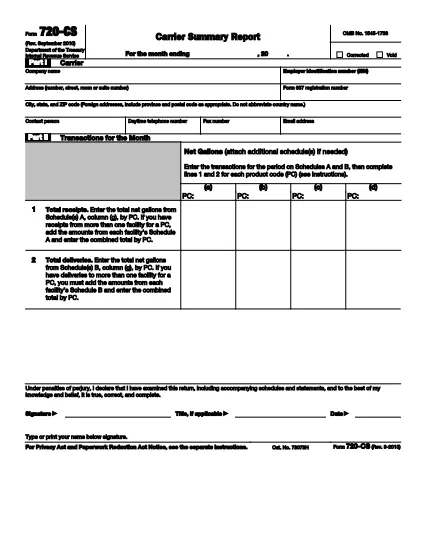
Form 720‑CS-ը պաշտոնական հարկային ձևերից մեկն է, որն օգտագործվում է Միացյալ Նահանգներում եկամուտները, նվազեցումները և վարկերը պահանջելու, հարկային պարտավորությունները հաշվարկելու և հարկերի հետ կապված այլ պարտավորություններ կատարելու համար: IRS-ը դաշնային գործակալությունն է, որը պատասխանատու է Միացյալ Նահանգներում ներքին եկամուտների մասին օրենքները կառավարելու և կիրարկելու համար:
Ահա Ներքին եկամուտների ծառայության ձևերի մի քանի օրինակ.
Ձև 1040. Սա անհատական եկամտահարկի հայտարարագրի հիմնական ձևն է, որն օգտագործվում է հարկ վճարողների մեծ մասի կողմից: Այն օգտագործվում է տարբեր տեսակի եկամուտների հաղորդման, նվազեցումների և վարկերի պահանջների, հարկային պարտավորությունների հաշվարկման և որոշելու համար, թե արդյոք հարկ վճարողը լրացուցիչ հարկ ունի, թե իրավունք ունի վերադարձնելու:
Ձև 1099. Կան 1099 ձևի տարբեր տարբերակներ, ինչպիսիք են 1099-MISC, 1099-INT, 1099-DIV և այլն: Այս ձևերն օգտագործվում են ֆիզիկական անձանց կամ ձեռնարկությունների կողմից ստացված եկամուտները զեկուցելու տարբեր աղբյուրներից, բացի զբաղվածությունից, օրինակ՝ ինքնազբաղվածությունից: եկամուտ, տոկոսային եկամուտ, շահաբաժինների եկամուտ և վարձակալության եկամուտ:
Ձև W-2. այս ձևն օգտագործվում է գործատուների կողմից՝ աշխատողներին վճարված աշխատավարձերը և հարկերը զեկուցելու համար։ պահվում է նրանց վարձատրությունից. Աշխատակիցներն օգտագործում են W-2 ձևի տեղեկատվությունը իրենց անհատական հարկային հայտարարագրերը լրացնելու համար:
Ձև 941. գործատուներն օգտագործում են այս ձևը` իրենց աշխատողների համար զբաղվածության հարկերը, ներառյալ դաշնային եկամտահարկը, Սոցիալական ապահովության հարկը և Medicare-ի հարկը զեկուցելու համար:
Ձև 1065. այս ձևն օգտագործվում է գործընկերությունների կողմից՝ իրենց եկամուտները, նվազեցումները և հարկային պարտավորությունները հայտնելու համար: Գործընկերություններն իրենք չեն վճարում եկամտահարկ. Փոխարենը, գործընկերները ներկայացնում են գործընկերության եկամտի իրենց մասնաբաժինը իրենց անհատական հարկային հայտարարագրերում:
Ձև 1120. Սա կորպորատիվ եկամտահարկի հայտարարագրի ձևն է, որն օգտագործվում է C կորպորացիաների կողմից՝ իրենց եկամուտը հայտնելու համար, նվազեցումները և հարկային պարտավորությունները:
Ձև 990. այս ձևն օգտագործվում է հարկերից ազատված կազմակերպությունների կողմից, ինչպիսիք են շահույթ չհետապնդող և բարեգործական կազմակերպությունները, զեկուցել իրենց ֆինանսական տեղեկատվությունը, գործունեությունը և համապատասխանությունը հարկային օրենսդրությանը:
Ձև 8862. այս ձևն օգտագործվում է այն հարկատուների կողմից, ովքեր նախկինում պահանջել են վաստակած եկամտահարկի վարկ (EITC) բայց այն չթույլատրվեց, և այժմ ուզում եմ նորից պահանջել:
Սրանք ընդամենը մի քանի օրինակներ են բազմաթիվ IRS ձևերի, որոնք գոյություն ունեն հարկերի հետ կապված տարբեր պարտավորություններ կատարելու համար: Անհատի կամ բիզնեսի համար պահանջվող հատուկ ձևերը կախված են նրանց յուրահատուկ հանգամանքներից, եկամտի աղբյուրներից և նվազեցումներից: Ցանկալի է այցելել Ներքին եկամուտների ծառայության պաշտոնական կայքը (www.irs.gov) կամ դիմել մասնագիտական հարկային խորհրդատվություն՝ կոնկրետ IRS-ի վերաբերյալ ճշգրիտ և արդի տեղեկատվություն ստանալու համար: ձեր հարկային իրավիճակին համապատասխան ձևեր: