
Selecione o idioma

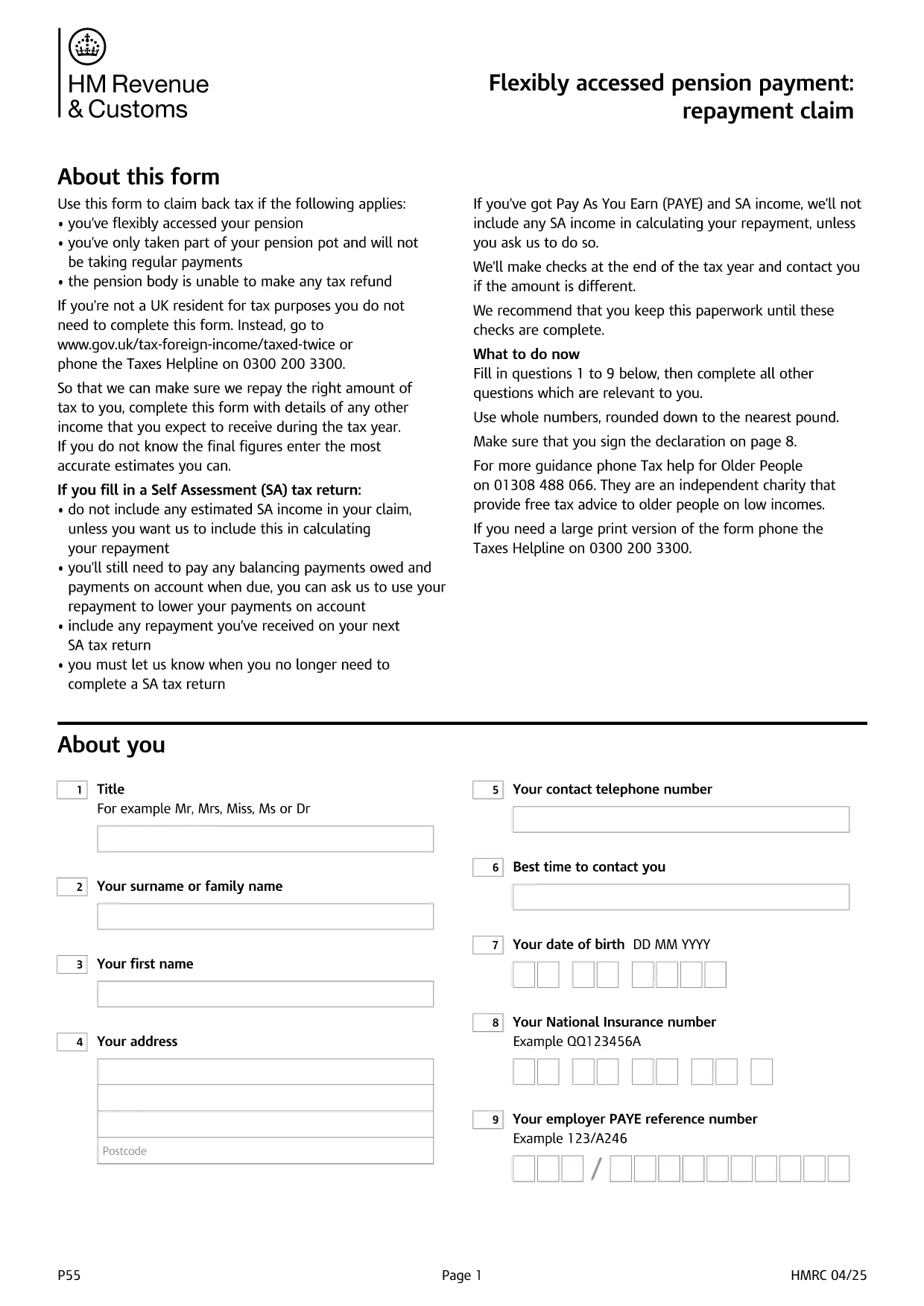
UK HMRC Form P55 – Fillable PDF for Pension Tax Refund

  1. Linguagem Inglês
  2. País United Kingdom
  3. Departamento HMRC
  4. Atividade impostos
UK HMRC Form P55 – Fillable PDF for Pension Tax Refund

Form P55 is the HMRC claim form used to recover tax that was over‑deducted when you accessed a portion of your pension flexibly. With the fillable PDF hosted by Formize, you can complete the form directly in your browser—no extra software required.

What Is HMRC Form P55?

The P55 is issued by HM Revenue & Customs (HMRC) to correct the "month‑1" emergency tax code that pension providers often apply to a one‑off withdrawal. It allows you to claim back the excess tax within the same tax year.

When and Why to Use Form P55

  • You have taken a partial pension withdrawal (not the whole pot).
  • The withdrawal was a single lump‑sum or occasional payment.
  • Your provider could not issue the refund themselves.
  • You want the refund sooner than the end‑of‑year reconciliation.

How to Complete Form P55 Online

Instead of downloading the PDF and editing it with a separate editor, simply click the "Fill out this form" button on this page. The Formize PDF Filler app will load, and you can:

  1. Enter your personal details, NI number, and bank account.
  2. Provide the pension payment information (gross amount, tax deducted, provider details).
  3. Add any other income you earned during the tax year.
  4. Sign electronically with a typed, drawn, or uploaded signature.
  5. Submit the completed form directly to HMRC or download it for postal submission.

Common Mistakes to Avoid

  • Leaving fields blank – HMRC will reject an incomplete claim.
  • Using the wrong tax year version – always select the form for the current tax year.
  • Mismatching your NI number or bank details – double‑check before submitting.
  • Forgetting to include other income – HMRC recalculates your total tax position.

Submit Your Claim & Receive Your Refund

After you finish, you can either:

  • Submit electronically via your HMRC Government Gateway account (fastest).
  • Print the completed PDF and post it to the address shown on the form.

HMRC typically processes a P55 claim within 30 days and pays the refund by Faster Payments or cheque.

PERGUNTAS FREQUENTES
  • What is the purpose of Form P55?

    Form P55 lets you claim back tax that was over‑deducted when you took a partial, one‑off pension withdrawal.

  • Do I need a new Form P55 each tax year?

    Yes. HMRC releases a new version every April, so always use the form that matches the current tax year.

  • Can I submit Form P55 online?

    Yes. After completing the fillable PDF, you can upload it through your HMRC Government Gateway account for the fastest processing.

  • How long does HMRC take to process a P55 claim?

    Typical processing time is up to 30 days, after which the refund is paid via Faster Payments or cheque.

  • What if I make another pension withdrawal later in the year?

    You may need to submit an additional P55 for the new withdrawal, or wait for the end‑of‑year reconciliation to settle the final tax position.

  • Is there a fee to use the Formize fillable PDF?

    Formize provides the fillable PDF for free; you only pay any standard HMRC filing fees if applicable.

  • What common errors cause a P55 to be rejected?

    Leaving required fields blank, using the wrong tax‑year version, or providing mismatched NI or bank details are the most frequent reasons.

COMO

Como preencher HMRC Form P55 gratuitamente, online em 5 etapas fáceis:

  1. 1
    Click the Fill‑out Button
    Press the "Fill out this form" button on the page. The Formize PDF Filler loads in seconds.
  2. 2
    Enter Your Details
    Fill in personal information, NI number, pension payment figures, and any other income for the tax year.
  3. 3
    Add Your Signature
    Use the built‑in signature tool to draw, upload, or type a legally‑binding signature.
  4. 4
    Submit or Download
    Choose to submit directly to HMRC via your Government Gateway account or download the completed PDF for postal submission.
  5. 5
    Receive Your Refund
    HMRC processes the claim within 30 days and sends the refund to your bank account or by cheque.
Aplicativo Formize PDF Filler
SOBRE

formulários de impostos

HMRC Form P55 é um dos formulários fiscais que são documentos usados ​​para relatar informações relacionadas a impostos à autoridade fiscal relevante. Existem vários tipos de formulários fiscais, incluindo formulários fiscais federais, estaduais e locais, que podem variar dependendo das circunstâncias e localização do contribuinte.

RECURSOS

Preenchimento de PDF

A maneira mais fácil de preencher formulários PDF online

  • Preencha HMRC Form P55 rapidamente
    Procurando uma maneira de preencher rapidamente HMRC Form P55 online? Com nosso preenchedor de formulário PDF online gratuito, você saberá como editar e preencher este documento PDF em menos de um minuto.
  • Editor de PDF online fácil de usar
    Cansado de imprimir arquivos PDF para poder editá-los antes de digitalizá-los novamente e enviá-los de volta? Edite documentos PDF gratuitamente online. Use nosso editor de PDF online para economizar tempo e papel.
  • Ótimas ferramentas, todas as plataformas
    Quer saber como preencher HMRC Form P55 em um Mac, ou talvez como usar um preenchimento de PDF grátis? Nossas ferramentas online de PDF funcionam em todas as plataformas.
  • Armazenamento seguro de arquivos
    Os arquivos "HMRC Form P55" concluídos são armazenados em um banco de dados seguro gerenciado pela hospedagem Amazon Cloud. Você pode excluir seus arquivos do nosso sistema a qualquer momento. Em qualquer caso, esses arquivos são excluídos automaticamente após 24 horas.
  • Converse com {palavra-chave}
    Converse com "HMRC Form P55" no Chatize, que é um assistente gratuito de leitura de PDF. Faça perguntas e obtenha respostas de "HMRC Form P55". Basta clicar no botão Bate-papo com documento acima.

Excluir sessão de preenchimento

Excluir a sessão de preenchimento selecionada? Nesse caso, seu progresso no preenchimento do formulário será perdido.

Excluir sessão de edição

Excluir a sessão de edição selecionada? Neste caso, o seu progresso na criação e edição do formulário será perdido.