
Sprache auswählen

IRS Form 433‑B – Fillable PDF Collection Statement for Businesses

  1. Land USA
  2. Sprache Englisch
  3. Aktivität Steuern
  4. Abteilung Finanzamt
IRS Form 433‑B – Fillable PDF Collection Statement for Businesses

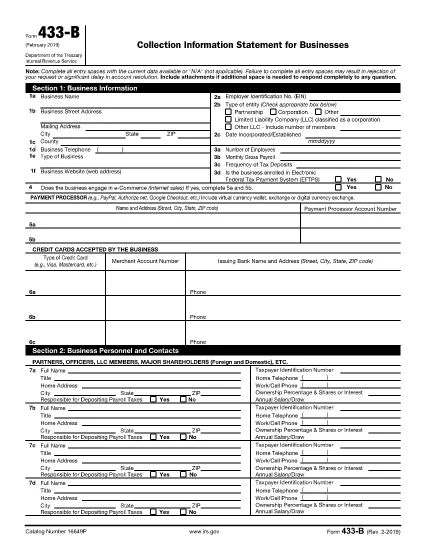
Form 433‑B, Collection Information Statement for Businesses, is the IRS’s standard form for gathering detailed financial data from corporations, partnerships, LLCs, and other business entities that owe tax. Completing this form accurately is essential when you are pursuing an Offer in Compromise, requesting a payment plan, or negotiating any other tax‑relief option.

What Is Form 433‑B and Who Needs It?

The form captures business information, assets, income, expenses, and the minimum offer amount the IRS will accept. It is required for:

  • Corporations (C‑corp, S‑corp)
  • Partnerships
  • LLCs taxed as corporations or partnerships
  • Any other entity with unpaid federal tax liabilities

Step‑by‑Step Guide to Fill Out Form 433‑B

Follow these simple steps using Formize’s built‑in PDF filler:

  1. Open the Fillable Form – Click the “Fill out this form” button on this page. The Formize PDF Filler loads automatically.
  2. Enter Business Information – Provide the legal name, EIN, address, phone, and a brief description of your business.
  3. Provide Officer/Owner Details – List each partner, officer, or member with name, title, ownership percentage, and salary.
  4. Report Assets – Include cash, bank accounts, real‑estate, equipment, vehicles, and any other valuable assets.
  5. Report Income & Expenses – Fill in monthly gross receipts, cost of goods sold, payroll, rent, utilities, and other operating costs.
  6. Calculate Minimum Offer – The form automatically totals the data; use the built‑in calculator to see the IRS‑required minimum offer amount.
  7. Review & Sign – Double‑check every field, then add the authorized signature and date.

Common Mistakes to Avoid

  • Leaving required fields blank – the IRS will reject the form.
  • Using outdated asset valuations – provide current market values.
  • Misclassifying the business entity – select the correct box for corporation, partnership, or LLC.
  • Forgetting to attach supporting documents – statements, depreciation schedules, and loan agreements are often required.

How to Submit the Completed Form

Once you finish, you have three options:

  • Download PDF and mail it to the IRS address indicated in the instructions.
  • Print & fax a hard copy to the appropriate IRS office.
  • Save securely and upload it through your IRS online account if you are working with a tax professional.

Using Formize ensures the PDF stays fillable and printable without losing formatting.

FAQ
  • What types of businesses must use Form 433‑B?

    Corporations, partnerships, and LLCs (taxed as corporations or partnerships) with unpaid federal tax liabilities are required to complete Form 433‑B.

  • Can I use Form 433‑B for a sole proprietorship?

    No. Sole proprietors should use Form 433‑A, the collection statement for wage earners and self‑employed individuals.

  • Is the PDF on Formize really fillable?

    Yes. The PDF retains all fillable fields, and the Formize online filler lets you type, save, and print without altering the original layout.

  • Do I need to attach supporting documents?

    Attach recent bank statements, asset appraisals, loan balances, and depreciation schedules as referenced in the form’s instructions.

  • How long does the IRS take to process a completed Form 433‑B?

    Processing time varies, but expect 30‑60 days for the IRS to review the information and respond to your request.

  • Can I submit the form electronically?

    The IRS does not accept an electronic upload for Form 433‑B directly. You must mail or fax the printed form, or provide it to your tax professional for electronic submission through the IRS portal.

  • What happens if I make a mistake on the form?

    Correct any errors before signing. If you discover a mistake after submission, send a revised form with “Amended” noted at the top of the first page.

WIE MAN

So füllen Sie IRS Form 433-B kostenlos online in 5 einfachen Schritten aus:

  1. 1
    Open the Fillable Form
    Click the “Fill out this form” button on this page. The Formize PDF Filler loads in your browser, no download required.
  2. 2
    Enter Business Information
    Type the legal name, EIN, address, phone number, and a short description of your business into the highlighted fields.
  3. 3
    Add Asset and Income Details
    Provide current values for cash, bank accounts, real‑estate, equipment, and vehicles. Then enter monthly income and expense figures.
  4. 4
    Review Calculations
    Use the built‑in calculator to verify the minimum offer amount and ensure all totals are correct.
  5. 5
    Submit or Print
    When you’re satisfied, click “Save PDF” to download a completed copy, or print directly from the filler to mail to the IRS.
Formize PDF Filler-App
ÜBER

Steuerformulare

IRS Form 433-B ist eines der Steuerformulare, mit denen Informationen zu Steuern an die zuständige Steuerbehörde gemeldet werden. Es gibt verschiedene Arten von Steuerformularen, einschließlich bundesstaatlicher, bundesstaatlicher und lokaler Steuerformulare, die je nach den Umständen und dem Standort des Steuerzahlers variieren können.

MERKMALE

PDF-Filler

Der einfachste Weg, PDF-Formulare online auszufüllen

  • Füllen Sie schnell IRS Form 433-B aus
    Suchen Sie nach einer Möglichkeit, IRS Form 433-B schnell online auszufüllen? Mit unserem kostenlosen Online-PDF-Formularausfüller wissen Sie, wie Sie dieses PDF-Dokument in weniger als einer Minute bearbeiten und ausfüllen.
  • Einfach zu bedienender Online-PDF-Editor
    Haben Sie es satt, PDF-Dateien auszudrucken, damit Sie sie bearbeiten können, bevor Sie sie erneut scannen und zurücksenden? PDF-Dokumente kostenlos online bearbeiten. Nutzen Sie unseren Online-PDF-Editor, um Zeit und Papier zu sparen.
  • Tolle Tools, alle Plattformen
    Sie fragen sich, wie Sie IRS Form 433-B auf einem Mac ausfüllen oder vielleicht einen kostenlosen PDF-Ausfüller verwenden können? Unsere Online-PDF-Tools funktionieren auf allen Plattformen.
  • Sichere Dateispeicherung
    Fertige "IRS Form 433-B"-Dateien werden in einer gesicherten Datenbank gespeichert, die vom Amazon Cloud-Hosting verwaltet wird. Sie können Ihre Dateien jederzeit aus unserem System löschen. In jedem Fall werden diese Dateien nach 24 Stunden automatisch gelöscht.
  • Chatten Sie mit IRS Form 433-B
    Chatten Sie mit „IRS Form 433-B“ auf Chatize, einem kostenlosen PDF-Leseassistenten. Stellen Sie Fragen und erhalten Sie Antworten von „IRS Form 433-B“. Klicken Sie einfach oben auf die Schaltfläche Mit Dokument chatten.

Füllsitzung löschen

Die ausgewählte Füllsitzung löschen? In diesem Fall gehen Ihre Fortschritte beim Ausfüllen des Formulars verloren.

Bearbeitungssitzung löschen

Ausgewählte Bearbeitungssitzung löschen? In diesem Fall geht Ihr Fortschritt beim Erstellen und Bearbeiten des Formulars verloren.