
Select language

IRS Form 433‑B – Fillable PDF Collection Statement for Businesses

  1. Country USA
  2. Language English
  3. Activity Taxes
  4. Department Internal Revenue Service
Fill out this form
IRS Form 433‑B – Fillable PDF Collection Statement for Businesses

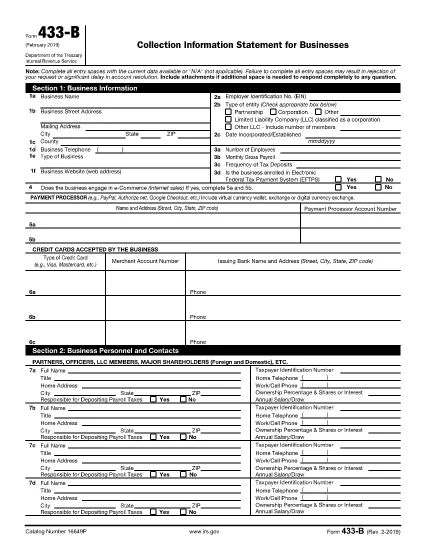
Form 433‑B, Collection Information Statement for Businesses, is the IRS’s standard form for gathering detailed financial data from corporations, partnerships, LLCs, and other business entities that owe tax. Completing this form accurately is essential when you are pursuing an Offer in Compromise, requesting a payment plan, or negotiating any other tax‑relief option.

What Is Form 433‑B and Who Needs It?

The form captures business information, assets, income, expenses, and the minimum offer amount the IRS will accept. It is required for:

  • Corporations (C‑corp, S‑corp)
  • Partnerships
  • LLCs taxed as corporations or partnerships
  • Any other entity with unpaid federal tax liabilities

Step‑by‑Step Guide to Fill Out Form 433‑B

Follow these simple steps using Formize’s built‑in PDF filler:

  1. Open the Fillable Form – Click the “Fill out this form” button on this page. The Formize PDF Filler loads automatically.
  2. Enter Business Information – Provide the legal name, EIN, address, phone, and a brief description of your business.
  3. Provide Officer/Owner Details – List each partner, officer, or member with name, title, ownership percentage, and salary.
  4. Report Assets – Include cash, bank accounts, real‑estate, equipment, vehicles, and any other valuable assets.
  5. Report Income & Expenses – Fill in monthly gross receipts, cost of goods sold, payroll, rent, utilities, and other operating costs.
  6. Calculate Minimum Offer – The form automatically totals the data; use the built‑in calculator to see the IRS‑required minimum offer amount.
  7. Review & Sign – Double‑check every field, then add the authorized signature and date.

Common Mistakes to Avoid

  • Leaving required fields blank – the IRS will reject the form.
  • Using outdated asset valuations – provide current market values.
  • Misclassifying the business entity – select the correct box for corporation, partnership, or LLC.
  • Forgetting to attach supporting documents – statements, depreciation schedules, and loan agreements are often required.

How to Submit the Completed Form

Once you finish, you have three options:

  • Download PDF and mail it to the IRS address indicated in the instructions.
  • Print & fax a hard copy to the appropriate IRS office.
  • Save securely and upload it through your IRS online account if you are working with a tax professional.

Using Formize ensures the PDF stays fillable and printable without losing formatting.

FAQ
  • What types of businesses must use Form 433‑B?

    Corporations, partnerships, and LLCs (taxed as corporations or partnerships) with unpaid federal tax liabilities are required to complete Form 433‑B.

  • Can I use Form 433‑B for a sole proprietorship?

    No. Sole proprietors should use Form 433‑A, the collection statement for wage earners and self‑employed individuals.

  • Is the PDF on Formize really fillable?

    Yes. The PDF retains all fillable fields, and the Formize online filler lets you type, save, and print without altering the original layout.

  • Do I need to attach supporting documents?

    Attach recent bank statements, asset appraisals, loan balances, and depreciation schedules as referenced in the form’s instructions.

  • How long does the IRS take to process a completed Form 433‑B?

    Processing time varies, but expect 30‑60 days for the IRS to review the information and respond to your request.

  • Can I submit the form electronically?

    The IRS does not accept an electronic upload for Form 433‑B directly. You must mail or fax the printed form, or provide it to your tax professional for electronic submission through the IRS portal.

  • What happens if I make a mistake on the form?

    Correct any errors before signing. If you discover a mistake after submission, send a revised form with “Amended” noted at the top of the first page.

HOW TO

How to fill out IRS Form 433-B for free, online in 5 easy steps:

  1. 1
    Open the Fillable Form
    Click the “Fill out this form” button on this page. The Formize PDF Filler loads in your browser, no download required.
  2. 2
    Enter Business Information
    Type the legal name, EIN, address, phone number, and a short description of your business into the highlighted fields.
  3. 3
    Add Asset and Income Details
    Provide current values for cash, bank accounts, real‑estate, equipment, and vehicles. Then enter monthly income and expense figures.
  4. 4
    Review Calculations
    Use the built‑in calculator to verify the minimum offer amount and ensure all totals are correct.
  5. 5
    Submit or Print
    When you’re satisfied, click “Save PDF” to download a completed copy, or print directly from the filler to mail to the IRS.
Formize PDF Filler app
ABOUT

Tax forms

IRS Form 433-B is one of Tax forms that are documents used to report information related to taxes to the relevant tax authority. There are various types of tax forms, including federal, state, and local tax forms, which can vary depending on the taxpayer's circumstances and location.

FEATURES

PDF Filler

The easiest way to fill IRS Form 433-B online

  • Quickly fill out IRS Form 433-B
    Looking for a way to quickly fill IRS Form 433-B online? With our online free PDF form filler, you’ll know how to how to edit and fill this pdf document in less than a minute.
  • Easy to use online PDF editor
    Fed up with printing out PDF files so you can edit them, before rescanning and sending them back? Edit PDF documents for free online. Use our online pdf editor to save time and paper.
  • Great tools, all platforms
    Wondering how to fill in IRS Form 433-B on a Mac, or maybe how to use a PDF filler free? Our online PDF tools work on all platforms.
  • Secure file storage
    Completed "IRS Form 433-B" files are stored in a secured database managed by Amazon Cloud hosting. You can delete your files from our system anytime. In any case, these files are automatically deleted after 24 hours.
  • Chat with IRS Form 433-B
    Chat with "IRS Form 433-B" on Chatize that is a free PDF reader assistant. Ask questions and get answers from "IRS Form 433-B". Just click on Chat With Document button above.

Delete filling session

Delete the selected filling session? In this case, your progress in completing the form will be lost.

Delete editing session

Delete the selected editing session? In this case, your progress in creating and editing the form will be lost.