
hamburger-menu icon
Აირჩიეთ ენა

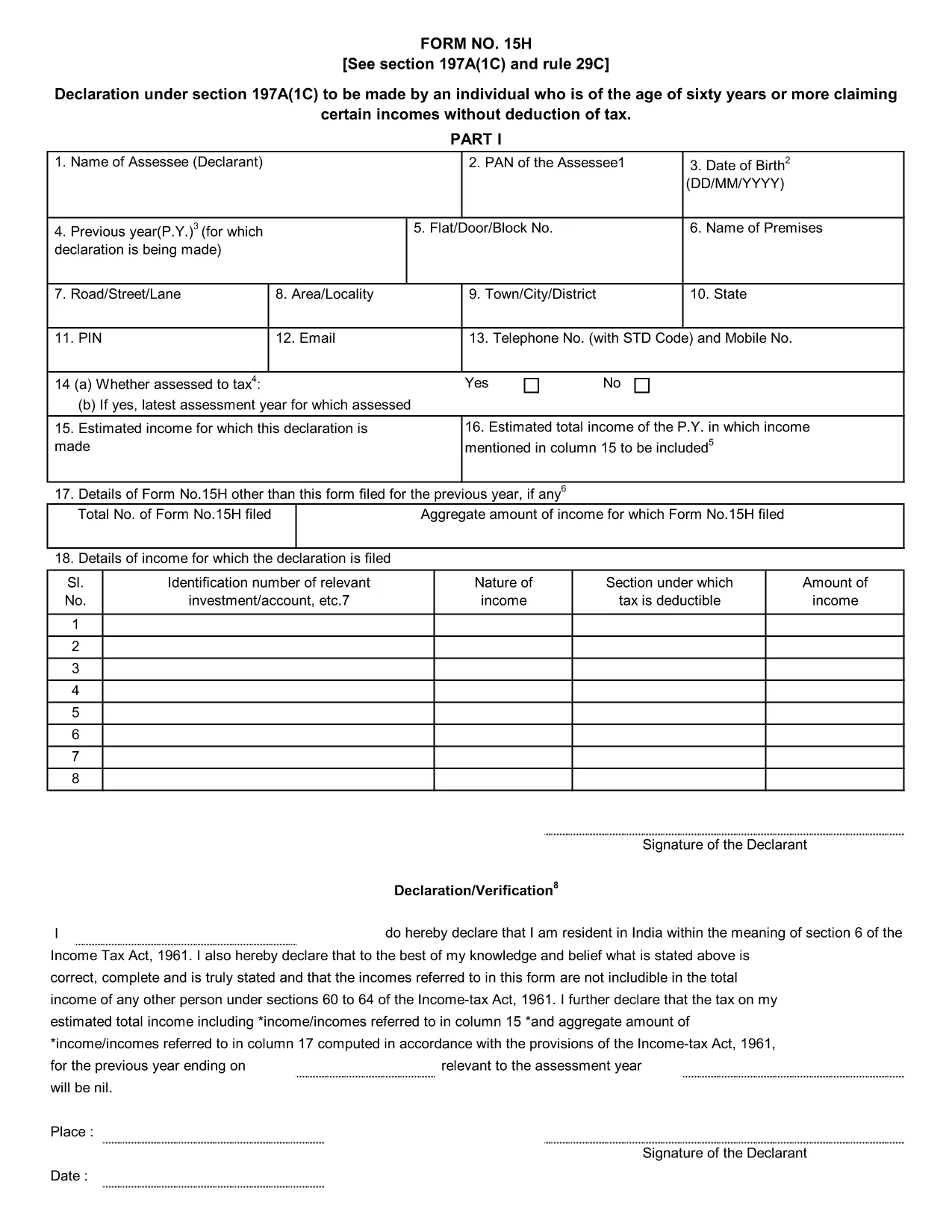
Form 15H – Senior Citizens’ Interest Income Declaration (Fillable PDF)

  1. Ენა ინგლისური
  2. ქვეყანა ინდოეთი
  3. აქტივობა Გადასახადები
Form 15H – Senior Citizens’ Interest Income Declaration (Fillable PDF)

Form 15H is a declaration under sub‑section (1C) of section 197A of the Income‑Tax Act, 1961. It allows senior citizens (aged 60 years or more) to request that tax be **not deducted at source (TDS)** on interest earned from bank or post‑office deposits, provided they meet certain income thresholds.

Who Can Use Form 15H?

  • Resident individuals aged 60 years or above.
  • Those whose total taxable income does not exceed the limits set by the Act (₹3 lakhs for ages 60‑79, ₹5 lakhs for 80 years and above).
  • Taxpayers who receive interest income from banks, post offices, or cooperative societies.

Eligibility & Income Limits

The Income‑Tax Department defines two income caps:

  • Age 60‑79: Taxable income ≤ ₹300,000 per financial year.
  • Age 80 and above: Taxable income ≤ ₹500,000 per financial year.

If your interest earnings are below ₹50,000 in a year, you are not required to submit Form 15H – the bank will not deduct TDS automatically.

How to Fill Form 15H Online

Instead of downloading the PDF and editing it locally, simply click the "Fill out this form" button on this page. The Formize PDF Filler app will load in your browser, allowing you to complete the declaration in a few easy steps:

  1. Enter your name, PAN, and address as they appear on your PAN card.
  2. Provide your bank account details where the interest is credited.
  3. Declare the total interest earned and confirm it is within the eligible limit.
  4. Sign electronically (or print, sign, and scan if you prefer a hard copy).
  5. Submit the form to your bank or download it for manual submission.

Common Mistakes to Avoid

  • Entering an incorrect PAN – the bank will reject the form.
  • Mis‑calculating total taxable income; always include salary, rent, and other earnings.
  • Submitting the form after the interest has already been taxed – it must be given **before** the bank deducts TDS.
  • Leaving the "Signature" field blank; an electronic signature is acceptable in most banks.

Download & Save the Fillable PDF

If you prefer a local copy, you can download the official fillable PDF below. The file retains the original layout and can be opened with any modern PDF reader.

Download Form 15H – Fillable PDF

Using Formize’s online filler saves time, reduces errors, and lets you submit the declaration instantly to your bank.

FAQ
  • What is the purpose of Form 15H?

    Form 15H allows senior citizens (60 years or older) to request that TDS be **not deducted** on interest income when their total taxable income is below the specified thresholds.

  • Can I use Form 15H if I am below 60 years?

    No. Individuals under 60 should use Form 15G, which serves the same purpose for younger taxpayers.

  • Do I need to submit Form 15H every financial year?

    Yes. The declaration is valid only for the financial year in which it is submitted. A new Form 15H must be provided each year you wish to claim the exemption.

  • What if my interest income exceeds ₹50,000?

    If interest exceeds ₹50,000, the bank will automatically deduct TDS unless you submit a valid Form 15H before the interest is credited.

  • Is an electronic signature accepted?

    Most banks accept an electronic signature entered via the Formize PDF Filler. If your bank requires a handwritten signature, print, sign, and scan the completed form.

  • Can I submit Form 15H online to the Income‑Tax Department?

    Form 15H is submitted to the **bank or post‑office** where the interest is credited, not directly to the Income‑Tax Department.

  • What happens if I submit an incorrect PAN?

    The bank will reject the form and may still deduct TDS. Ensure the PAN matches the one on your PAN card.

  • Do I need to attach any supporting documents?

    Generally no. The form itself is sufficient, but keep your interest statements handy in case the bank requests verification.

ᲠᲝᲒᲝᲠ

როგორ შეავსოთ Form 15H უფასოდ, ონლაინ 5 მარტივი ნაბიჯებით:

  1. 1
    Click the Fill‑out Button
    Press the "Fill out this form" button on the page. The Formize PDF Filler loads instantly in your browser.
  2. 2
    Enter Your Details
    Provide your name, PAN, address, bank account number, and total interest earned as prompted.
  3. 3
    Verify Income Limits
    The filler will automatically check that your total taxable income is within the ₹3 Lakh or ₹5 Lakh limits based on age.
  4. 4
    Add Your Signature
    Use the electronic signature tool or upload a scanned signature image.
  5. 5
    Submit or Download
    Send the completed form directly to your bank via their portal, or download the PDF for manual submission.
PDF შემავსებლის აპლიკაციის ფორმირება
ᲨᲔᲡᲐᲮᲔᲑ

საგადასახადო ფორმები

Form 15H არის ერთ-ერთი საგადასახადო ფორმა, რომელიც წარმოადგენს დოკუმენტებს, რომლებიც გამოიყენება გადასახადებთან დაკავშირებული ინფორმაციის შესაბამის საგადასახადო ორგანოში მოსახსენებლად. არსებობს სხვადასხვა სახის საგადასახადო ფორმები, მათ შორის ფედერალური, სახელმწიფო და ადგილობრივი საგადასახადო ფორმები, რომლებიც შეიძლება განსხვავდებოდეს გადასახადის გადამხდელის გარემოებებისა და ადგილმდებარეობის მიხედვით.

ᲛᲐᲮᲐᲡᲘᲐᲗᲔᲑᲚᲔᲑᲘ

PDF შემავსებელი

ონლაინ Form 15H-ის შევსების უმარტივესი გზა

  • სწრაფად შეავსეთ Form 15H
    ეძებთ გზას სწრაფად შეავსოთ Form 15H ონლაინ? ჩვენი ონლაინ უფასო PDF ფორმის შემავსებლით, თქვენ გეცოდინებათ როგორ შეცვალოთ და შეავსოთ ეს pdf დოკუმენტი ერთ წუთზე ნაკლებ დროში.
  • მარტივი გამოსაყენებელი ონლაინ PDF რედაქტორი
    მოგბეზრდათ PDF ფაილების დაბეჭდვა, რათა მათი რედაქტირება შეძლოთ, ხელახლა სკანირებამდე და უკან გაგზავნამდე? შეცვალეთ PDF დოკუმენტები უფასოდ ონლაინ. გამოიყენეთ ჩვენი ონლაინ pdf რედაქტორი დროისა და ქაღალდის დაზოგვისთვის.
  • შესანიშნავი ხელსაწყოები, ყველა პლატფორმა
    გაინტერესებთ როგორ შეავსოთ Form 15H Mac-ზე, ან იქნებ როგორ გამოიყენოთ PDF შემავსებელი უფასოდ? ჩვენი ონლაინ PDF ინსტრუმენტები მუშაობს ყველა პლატფორმაზე.
  • ფაილების უსაფრთხო შენახვა
    დასრულებული „Form 15H“ ფაილები ინახება დაცულ მონაცემთა ბაზაში, რომელსაც მართავს Amazon Cloud ჰოსტინგი. თქვენ შეგიძლიათ წაშალოთ თქვენი ფაილები ჩვენი სისტემიდან ნებისმიერ დროს. ნებისმიერ შემთხვევაში, ეს ფაილები ავტომატურად იშლება 24 საათის შემდეგ.
  • ჩატი Form 15H-ით
    ესაუბრეთ „Form 15H“-ს Chatize-ზე, რომელიც არის PDF წამკითხველის უფასო ასისტენტი. დასვით კითხვები და მიიღეთ პასუხები „Form 15H“-დან. უბრალოდ დააწკაპუნეთ ღილაკზე ჩატი დოკუმენტთან ზემოთ.

შევსების სესიის წაშლა

წაშალოთ არჩეული შევსების სესია? ამ შემთხვევაში, თქვენი პროგრესი ფორმის შევსებაში დაიკარგება.

რედაქტირების სესიის წაშლა

წაშალოთ არჩეული რედაქტირების სესია? ამ შემთხვევაში, თქვენი პროგრესი ფორმის შექმნასა და რედაქტირებაში დაიკარგება.