
Chọn ngôn ngữ

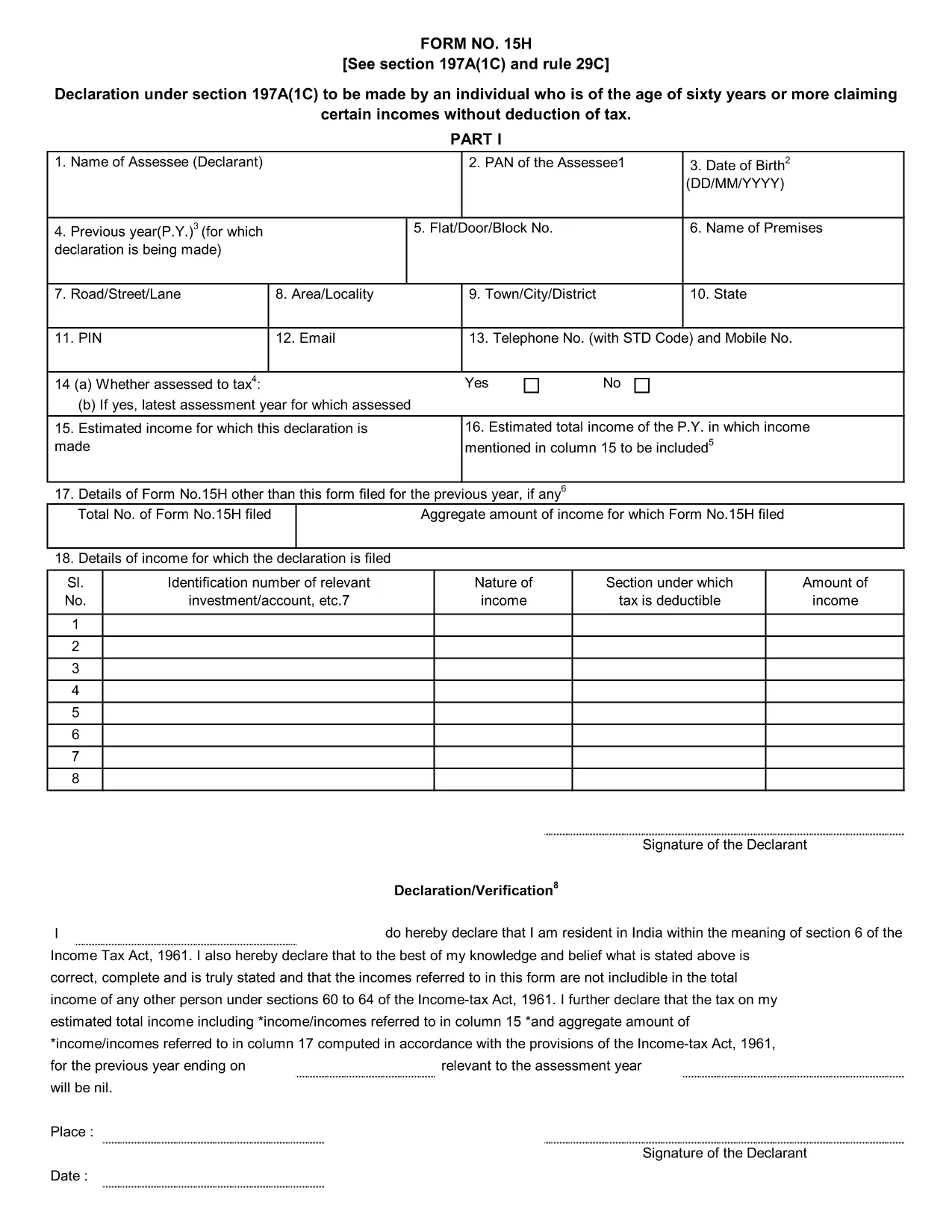
Form 15H – Senior Citizens’ Interest Income Declaration (Fillable PDF)

  1. Ngôn ngữ Tiếng Anh
  2. Quốc gia Ấn Độ
  3. Hoạt động thuế
Form 15H – Senior Citizens’ Interest Income Declaration (Fillable PDF)

Form 15H is a declaration under sub‑section (1C) of section 197A of the Income‑Tax Act, 1961. It allows senior citizens (aged 60 years or more) to request that tax be **not deducted at source (TDS)** on interest earned from bank or post‑office deposits, provided they meet certain income thresholds.

Who Can Use Form 15H?

  • Resident individuals aged 60 years or above.
  • Those whose total taxable income does not exceed the limits set by the Act (₹3 lakhs for ages 60‑79, ₹5 lakhs for 80 years and above).
  • Taxpayers who receive interest income from banks, post offices, or cooperative societies.

Eligibility & Income Limits

The Income‑Tax Department defines two income caps:

  • Age 60‑79: Taxable income ≤ ₹300,000 per financial year.
  • Age 80 and above: Taxable income ≤ ₹500,000 per financial year.

If your interest earnings are below ₹50,000 in a year, you are not required to submit Form 15H – the bank will not deduct TDS automatically.

How to Fill Form 15H Online

Instead of downloading the PDF and editing it locally, simply click the "Fill out this form" button on this page. The Formize PDF Filler app will load in your browser, allowing you to complete the declaration in a few easy steps:

  1. Enter your name, PAN, and address as they appear on your PAN card.
  2. Provide your bank account details where the interest is credited.
  3. Declare the total interest earned and confirm it is within the eligible limit.
  4. Sign electronically (or print, sign, and scan if you prefer a hard copy).
  5. Submit the form to your bank or download it for manual submission.

Common Mistakes to Avoid

  • Entering an incorrect PAN – the bank will reject the form.
  • Mis‑calculating total taxable income; always include salary, rent, and other earnings.
  • Submitting the form after the interest has already been taxed – it must be given **before** the bank deducts TDS.
  • Leaving the "Signature" field blank; an electronic signature is acceptable in most banks.

Download & Save the Fillable PDF

If you prefer a local copy, you can download the official fillable PDF below. The file retains the original layout and can be opened with any modern PDF reader.

Download Form 15H – Fillable PDF

Using Formize’s online filler saves time, reduces errors, and lets you submit the declaration instantly to your bank.

CÂU HỎI THƯỜNG GẶP
  • What is the purpose of Form 15H?

    Form 15H allows senior citizens (60 years or older) to request that TDS be **not deducted** on interest income when their total taxable income is below the specified thresholds.

  • Can I use Form 15H if I am below 60 years?

    No. Individuals under 60 should use Form 15G, which serves the same purpose for younger taxpayers.

  • Do I need to submit Form 15H every financial year?

    Yes. The declaration is valid only for the financial year in which it is submitted. A new Form 15H must be provided each year you wish to claim the exemption.

  • What if my interest income exceeds ₹50,000?

    If interest exceeds ₹50,000, the bank will automatically deduct TDS unless you submit a valid Form 15H before the interest is credited.

  • Is an electronic signature accepted?

    Most banks accept an electronic signature entered via the Formize PDF Filler. If your bank requires a handwritten signature, print, sign, and scan the completed form.

  • Can I submit Form 15H online to the Income‑Tax Department?

    Form 15H is submitted to the **bank or post‑office** where the interest is credited, not directly to the Income‑Tax Department.

  • What happens if I submit an incorrect PAN?

    The bank will reject the form and may still deduct TDS. Ensure the PAN matches the one on your PAN card.

  • Do I need to attach any supporting documents?

    Generally no. The form itself is sufficient, but keep your interest statements handy in case the bank requests verification.

LÀM THẾ NÀO ĐỂ

Cách điền Form 15H miễn phí, trực tuyến trong 5 bước đơn giản:

  1. 1
    Click the Fill‑out Button
    Press the "Fill out this form" button on the page. The Formize PDF Filler loads instantly in your browser.
  2. 2
    Enter Your Details
    Provide your name, PAN, address, bank account number, and total interest earned as prompted.
  3. 3
    Verify Income Limits
    The filler will automatically check that your total taxable income is within the ₹3 Lakh or ₹5 Lakh limits based on age.
  4. 4
    Add Your Signature
    Use the electronic signature tool or upload a scanned signature image.
  5. 5
    Submit or Download
    Send the completed form directly to your bank via their portal, or download the PDF for manual submission.
Định dạng ứng dụng PDF Filler
TRONG KHOẢNG

Biểu mẫu Cục Thuế thu nhập

Form 15H là một trong những biểu mẫu chính thức được Cục thuế thu nhập Ấn Độ sử dụng để quản lý và thu thuế thu nhập. Những biểu mẫu này được người nộp thuế sử dụng để báo cáo thu nhập, các khoản khấu trừ và nghĩa vụ thuế của họ với cơ quan thuế.

Dưới đây là một số biểu mẫu của Cục Thuế thu nhập thường được sử dụng ở Ấn Độ:

ITR-1 (Sahaj): Biểu mẫu này được sử dụng bởi các cá nhân có thu nhập từ tiền lương, tài sản một căn nhà và các nguồn khác như tiền lãi, lương hưu hoặc lương hưu gia đình. Nó được áp dụng cho các cá nhân có tổng thu nhập lên tới Rs. 50 vạn.

ITR-2: Biểu mẫu này được sử dụng bởi các cá nhân và người theo đạo Hindu Gia đình không phân chia (HUF) có thu nhập từ các nguồn khác ngoài kinh doanh hoặc nghề nghiệp. Nó được áp dụng cho các cá nhân có tổng thu nhập vượt quá Rs. 50 vạn hoặc có tài sản / thu nhập nước ngoài.

ITR-3: Biểu mẫu này được sử dụng bởi các cá nhân và HUF có thu nhập từ kinh doanh hoặc nghề nghiệp. Nó được áp dụng cho các cá nhân có thu nhập từ một công ty hợp danh và các chuyên gia thực hiện một nghề nghiệp.

ITR-4 (Sugam): Biểu mẫu này được sử dụng bởi các cá nhân, HUF và các công ty (trừ LLP) đã chọn chương trình thuế khoán theo các mục 44AD, 44ADA hoặc 44AE của Đạo luật thuế thu nhập.

Mẫu 16: Biểu mẫu này do người sử dụng lao động cung cấp cho nhân viên và chứa thông tin chi tiết tiền lương, thuế khấu trừ tại nguồn (TDS) và các thông tin liên quan khác. Nó giúp nhân viên nộp tờ khai thuế thu nhập một cách chính xác.

Mẫu 26AS: Đây không phải là biểu mẫu mà là báo cáo thuế tổng hợp hàng năm cung cấp bản tóm tắt các thông tin liên quan đến thuế như TDS, thuế tạm ứng và thuế tự định do người nộp thuế nộp. Nó giúp người nộp thuế xác minh chéo nghĩa vụ thuế của họ trong khi nộp tờ khai thuế thu nhập.

Đây chỉ là một vài ví dụ về các biểu mẫu của Cục Thuế thu nhập ở Ấn Độ. Các biểu mẫu và yêu cầu cụ thể có thể khác nhau tùy theo tính chất thu nhập, loại người nộp thuế và luật thuế hiện hành ở Ấn Độ. Điều quan trọng là phải tham khảo trang web chính thức của Cục Thuế thu nhập Ấn Độ (www.profittaxindia.gov.in) hoặc tìm kiếm lời khuyên chuyên nghiệp để có được thông tin chính xác và cập nhật về các biểu mẫu thuế thu nhập cụ thể có liên quan đến tình hình thuế của bạn ở Ấn Độ.

ĐẶC TRƯNG

Trình điền PDF

Cách dễ nhất để điền vào các mẫu PDF trực tuyến

  • Nhanh chóng điền vào Form 15H
    Bạn đang tìm cách điền nhanh Form 15H trực tuyến? Với trình điền biểu mẫu PDF miễn phí trực tuyến của chúng tôi, bạn sẽ biết cách chỉnh sửa và điền vào tài liệu pdf này trong vòng chưa đầy một phút.
  • Trình chỉnh sửa PDF trực tuyến dễ sử dụng
    Chán nản với việc in ra các tệp PDF để bạn có thể chỉnh sửa chúng trước khi quét lại và gửi lại? Chỉnh sửa tài liệu PDF trực tuyến miễn phí. Sử dụng trình chỉnh sửa pdf trực tuyến của chúng tôi để tiết kiệm thời gian và giấy.
  • Công cụ tuyệt vời, tất cả các nền tảng
    Bạn muốn biết cách điền Form 15H trên máy Mac hoặc có thể là cách sử dụng trình điền PDF miễn phí? Các công cụ PDF trực tuyến của chúng tôi hoạt động trên tất cả các nền tảng.
  • Lưu trữ tệp an toàn
    Các tệp "Form 15H" đã hoàn thành được lưu trữ trong cơ sở dữ liệu bảo mật do dịch vụ lưu trữ Amazon Cloud quản lý. Bạn có thể xóa các tệp của mình khỏi hệ thống của chúng tôi bất cứ lúc nào. Trong mọi trường hợp, các tệp này sẽ tự động bị xóa sau 24 giờ.
  • Trò chuyện với Form 15H
    Trò chuyện với "Form 15H" trên Trò chuyện, một trợ lý đọc PDF miễn phí. Đặt câu hỏi và nhận câu trả lời từ "Form 15H". Chỉ cần nhấp vào nút Trò chuyện với tài liệu ở trên.

Xóa phiên điền

Xóa phiên điền đã chọn? Trong trường hợp này, tiến độ của bạn trong việc hoàn thành biểu mẫu sẽ bị mất.

Xóa phiên chỉnh sửa

Xóa phiên chỉnh sửa đã chọn? Trong trường hợp này, tiến trình tạo và chỉnh sửa biểu mẫu của bạn sẽ bị mất.